

Hyper Liquid PCs

Hyper Liquid PCs
Our exclusive Hyper Liquid range of water cooled PCs is designed for those who desire ultra-fast frame rates, ice-cold temperatures, and exceptional aesthetics. Our expert technicians combine world-renowned components with high-grade water cooling technology to allow you to experience maximum computing performance while keeping your parts cool and quiet. Choose your loop style, colour, and lighting to make your new liquid-cooled PC your own.
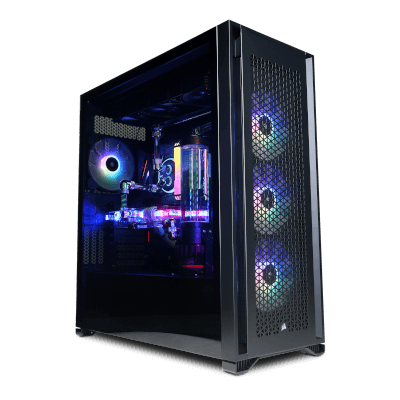
Hyper Liquid Infinity
Windows 11 Home Intel® Core™ i7-14700KF NVIDIA® GeForce RTX™ 5090 32GB Founders Edition 32GB DDR5 6000MT/s Corsair MSI MAG Z790 Tomahawk WIFI 2TB PCIe 5.0 NVMe WD Black
Estimated dispatch date: Monday, 12/10/2026
Hyper Liquid Ultra
Windows 11 Home AMD Ryzen™ 9 9950X3D NVIDIA® GeForce RTX™ 5090 32GB Founders Edition 32GB DDR5 6000MT/s Corsair MSI Pro X870E-P 2TB PCIe 5.0 NVMe WD Black
Estimated dispatch date: Monday, 12/10/2026

Hyper Liquid Ultra Dual
Windows 11 Home AMD Ryzen™ 9 9950X3D MSI GeForce RTX™ 5090 32G VENTUS 3X - with Bitspower Nebula Classic VGA Block 64GB DDR5 6400MT/s Kingston MSI MPG X870E Edge TI WIFI 2TB PCIe 5.0 NVMe WD Black

Hyper Liquid PCs

1. Radiator
Maximises heat dissipation and ensures cool temperatures for your CPU and GPU.

2. CPU Block
Maximise CPU performance by drawing heat away from the CPU and into the coolant.

3. Tubing
Rigid and soft tubing that carries the liquid from one component involved in cooling to another.

4. Pump / Reservoir
The pump drives coolant flow throughout the loop, while the reservoir maintains excess liquid and replaces air bubbles.
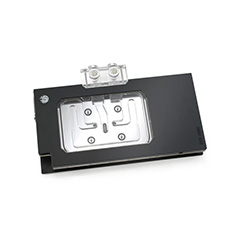
5. GPU Block
The same function but for your GPU, drawing away heat to get the best possible performance.

6. Fans
Draws cool outside air into the case, expels warm air from inside and cools specific components by moving air across a heat sink.
Hyper Liquid Aftercare
Looking after your Hyper Liquid PC is so important, this is to make sure it performs the best and lasts as long as possible. In… After Care for liquid PCs
The differences between liquid cooling and AIO
Let’s Chat about something really important that needs to be talked about: how to keep your PC nice and cool. We know what it feels like when… Liquid Cooling and AIO
What is Liquid Cooling
Beginner’s Guide to Liquid Cooling PCs So, you’ve been hearing all about liquid cooling PC setups and wondering if it’s the right move for your… Beginner Liquid Cooling PC
Frequently Asked Questions
Why would I need a water cooled PC?
A water cooled PC is useful when your components produce more heat than air cooling can handle quietly. A powerful, current processor paired with an NVIDIA GeForce RTX 5090 can draw well over 700W when combined under load, and a custom loop moves that heat to large radiators where it can be removed quickly and efficiently, rather than relying on heatsinks packed around the components. The result is ice-cold temperatures, sustained performance through long gaming sessions and less fan noise under heavy load. For mid-range systems, a good air cooler or AIO is typically enough.
How does water cooling actually work?
Water cooling essentially works by directing heat away from components through a liquid, which absorbs and carries heat far more effectively than air, with roughly four times the specific heat capacity. Copper water blocks sit directly on the CPU and GPU, drawing heat through a thin layer of thermal paste into coolant flowing through fine channels in the block. A pump circulates the warmed coolant to one or more radiators, where fans push air through thin fins to release the heat outside the case, and the cooled liquid then returns to the loop. Because the heat is carried to wherever the radiators sit, the components themselves stay cooler than any heatsink mounted on top of them could possibly manage.
Does water cooling improve gaming performance?
Water cooling doesn’t exactly add frames per second on its own, however, it lets your hardware hold its maximum performance for longer. Modern CPUs and GPUs automatically boost their clock speeds when they have more thermal headroom and pull them back when temperatures rise, so a cooler system keeps higher clocks through long gaming sessions rather than throttling. It also creates extra headroom for overclocking, and lowers overall noise, as radiators can shed heat with slower fan speeds than air coolers need.
Why water cool an NVIDIA graphics card?
The graphics card is the largest heat source inside of a gaming PC, and an NVIDIA GeForce RTX 5090 alone can draw up to 575W under load. A full cover water block cools the GPU core, video memory and power delivery together, keeping temperatures far lower than even the largest air coolers while running far more quietly. It also shrinks the GPU’s footprint, as the bulky multi-slot air cooler is replaced by a slim block. Every system in our Hyper Liquid range pairs an RTX 5090 with custom liquid cooling, including the Hyper Liquid Ultra, the most popular configuration within this range.
What is the best coolant for PC water cooling?
The best coolant for most PC water cooling loops is a clear, pre-mixed coolant designed specifically for PCs, which contains corrosion inhibitors and a biocide to stop any potential metal damage or biological growth. Clear coolants need the least maintenance, while opaque or pastel coolants look excellent, but can leave residue in water blocks and typically need flushing more often. If you are unsure on the best coolant for your water cooled PC, our service team is available by call, email or live chat to walk you through each option clearly. Please do not use any liquids that aren’t specifically designed for water cooled PCs, like tap water or car anti-freeze.
What is the difference between an AIO and a custom water cooling loop?
An AIO cooler is a sealed, pre-filled unit that typically cools only the processor and requires no maintenance, while a custom loop is built from individual parts and can cool both the CPU and graphics card with larger radiators. Custom loops deliver the coldest temperatures and quietest operation under heavy load, but they require the coolant to be changed roughly once a year. Our Liquid Cooling Service Plan handles this for £150 + VAT, including collection from UK mainland addresses, a full drain and clean, replacement tubing where needed, as well as leak, pressure and performance testing. This usually takes 5-7 working days to complete upon arrival, but can differ during busy periods or if a specific component required isn’t in stock.
How Often Does a Water Cooling PC Leak?
Leaks are very rare in a professionally built loop, and when they do happen the cause is almost always an assembly error rather than a component failing on its own. Every Hyper Liquid gaming PC is assembled by our own team, then filled, cycled, rigorously pressure tested as well as leak tested; the same quality control process every PC we build goes through before dispatch. Modern compression fittings seal mechanically rather than relying only on pressure, so once a loop has passed testing it is stable. The highest risk moments of a leak within a water cooled PC are a first-time self-build and the period just after a loop has been opened for maintenance, which is why our Liquid Cooling Service Plan repeats the full leak, pressure and performance testing before your PC comes back to you. Every Hyper Liquid PC is also covered by our standard warranty with UK-based support, so if anything ever does go wrong there is a team available by call, email or live chat.