

Best AI Workstation PCs for Enterprises

NVIDIA DGX SPARK ASUS ASCENT GX10 1TB AI Computer
NVIDIA DGX™ OS (Pre-installed NVIDIA AI Software Stack) ARM v9.2-A CPU (GB10) NVIDIA Blackwell GPU (GB10, integrated) 128GB LPDDR5x Coherent Unified Memory 1TB NVMe M.2 2242 PCIe 4.0
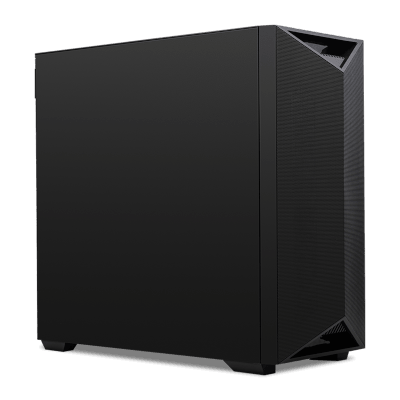
NVIDIA DGX STATION MSI XpertStation WS300T60L
Ubuntu with NVIDIA AI Developer Tools NVIDIA Grace 72-Core Neoverse V2 NVIDIA Blackwell Ultra 748GB Coherent Memory 4TB (2x2TB) NVMe M.2 2280 PCIe 5.0
0 Review
Estimated dispatch date: Tuesday, 5/1/2027

NVIDIA DGX Spark Personal AI Computer
NVIDIA DGX™ OS (Pre-installed NVIDIA AI Software Stack) 20 core Arm, 10 Cortex-X925 + 10 Cortex-A725 Arm NVIDIA GB10 Grace Blackwell Superchip 128GB LPDDR5x Coherent Unified Memory 4TB NVMe M.2 with Self-Encryption
Estimated dispatch date: Monday, 9/11/2026

NVIDIA DGX STATION ASUS ExpertCenter Pro ET900N G3 4TB
Ubuntu with NVIDIA AI Developer Tools NVIDIA Grace 72-Core Neoverse V2 NVIDIA Blackwell Ultra 748GB Coherent Memory 4TB (2x2TB) NVMe M.2 2280 PCIe 5.0
0 Review
Estimated dispatch date: Friday, 27/11/2026

NVIDIA DGX STATION ASUS ExpertCenter Pro ET900N G3 8TB
Ubuntu with NVIDIA AI Developer Tools NVIDIA Grace 72-Core Neoverse V2 NVIDIA Blackwell Ultra 748GB Coherent Memory 8TB (4x2TB) NVMe M.2 2280 PCIe 5.0
0 Review
Estimated dispatch date: Tuesday, 5/1/2027
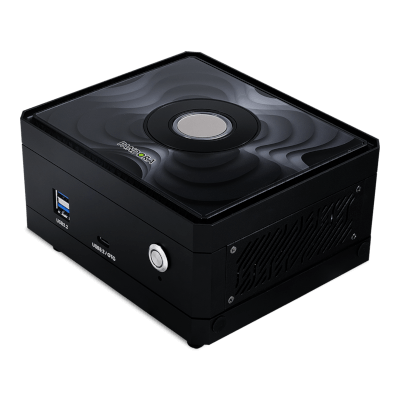
NVIDIA JETSON ORIN NX SUPER PALIT PANDORA 16GB AI Computer
NVIDIA Jetson Linus (Pre-installed NVIDIA JetPack SDK) 8-Core Arm® Cortex®-A78AE v8.2 64-Bit CPU NVIDIA Ampere Architecture 16GB 128-bit LPDDR5 128GB M.2 2280 PCIe Gen4
0 Review
Estimated dispatch date: Friday, 27/11/2026
NVIDIA JETSON ORIN NX SUPER PALIT PANDORA 8GB AI Computer
NVIDIA Jetson Linus (Pre-installed NVIDIA JetPack SDK) 6-Core Arm® Cortex®-A78AE v8.2 64-Bit CPU NVIDIA Ampere Architecture 8GB 128-bit LPDDR5 128GB M.2 2280 PCIe Gen4
0 Review
Estimated dispatch date: Friday, 27/11/2026

Ryzen RTX PRO AI Workstation PC
Windows 11 Pro AMD Ryzen™ 9 9950X3D 2x NVIDIA® RTX™ PRO 4500 Blackwell 32GB 64GB DDR5 6000MT/s Kingston ASUS ProArt X870E-CREATOR WIFI ATX 1TB PCIe 5.0 NVMe Kingston
0 Review
Estimated dispatch date: Wednesday, 18/11/2026
Threadripper Radeon Pro AI Workstation PC
Windows 11 Pro Workstations AMD Ryzen™ Threadripper™ PRO 9975WX 4x AMD Radeon™ AI PRO R9700 32GB 128GB DDR5 6000MT/s Kingston ASUS Pro WS TRX50-SAGE WIFI A 1TB PCIe 5.0 NVMe Kingston
0 Review
Nothing Found.
Frequently Asked Questions
What is an AI workstation?
An AI workstation is a computer specifically configured for machine learning work, where performance is determined by GPU compute and, above all, by available GPU memory. Training, fine-tuning and running AI models locally all need the model in memory, so VRAM capacity decides what you can run at all, while GPU compute decides how fast. That makes an AI workstation a different to a standard workstation, where processor cores and system memory usually matter more.
What is the difference between an AI workstation and a regular workstation PC?
A workstation PC is designed around CPU performance, system memory and certified graphics drivers for software such as CAD, Revit and SolidWorks. An AI workstation puts more towards the GPU, prioritising high-VRAM graphics cards, PCIe lanes for multiple GPUs, and memory bandwidth to keep those GPUs fed. There is overlap, as both benefit from high core counts and ECC memory, but a workstation specified for 3D rendering will not necessarily run the AI models you want locally, and vice versa.
How much GPU memory do I need to run AI models locally?
GPU memory is the hard limit on which AI models you can or can’t run, and the rule of thumb is approximately 2GB of VRAM per billion parameters at full 16-bit precision, or around 0.5GB per billion when quantised to 4-bit. A 70-billion-parameter model therefore needs about 140GB unquantised, or closer to 40GB quantised. For fine-tuning and larger models, systems with large unified memory pools such as the NVIDIA DGX Spark are built around exactly this constraint, whilst multi-GPU configurations pool VRAM across cards.
Do I need ECC memory for AI work?
ECC memory is worth having for any workload where a silent error could be expensive and highly disruptive to workflow and productivity, and AI training qualifies. It detects and corrects the single-bit errors that standard memory can pass through unnoticed, where the result is not a crash but a subtly wrong output after a run lasting hours or days. ECC requires a supporting platform, which means an AMD Threadripper PRO or Intel Xeon W build rather than a regular desktop one. For inference on already-trained models, standard memory is typically adequate.
How does an AI workstation improve productivity?
An AI workstation removes the waiting that breaks concentration. Local inference returns results in just a few seconds rather than queuing behind other users or paying per request, meaning you can iterate on prompts, parameters and datasets just as quickly as you can think. Fine-tuning runs that would otherwise be scheduled overnight on shared infrastructure would be able to run on your own machine while you work on something else. For teams, it also removes the approval process that comes with sending data to a third-party service, which is typically the real bottleneck.
How much does an AI workstation cost?
AI workstations span a wide range, as the graphics card typically accounts for the majority of the cost. Entry configurations using a single high-VRAM professional card suit inference and smaller fine-tuning jobs, while multi-GPU systems on Threadripper PRO or Xeon W platforms, and dedicated desktop AI supercomputers such as the ASUS Ascent GX10, are considerably higher. The most useful way to budget is to work backwards from the largest model you need to run locally, as VRAM capacity determines the GPU and the GPU decides most of the price.