When it comes to your gaming setup, cables are rarely the most exciting part of the process. GPUs, CPUs, and aesthetics tend to steal the spotlight. But the connection between your graphics card and your monitor matters more than many gamers realise.
If you’re building or buying a gaming PC in 2026, make sure these components are matched correctly- and then use the correct cable to unlock their full potential. When you’ve invested in serious gaming hardware, the last thing you want is a misplaced cable holding you back.
This guide breaks down the two main options available- HDMI and DisplayPort. We’ll cover:
- What is HDMI?
- What is DisplayPort?
- HDMI vs DisplayPort: The core differences
- Do HDMI and DisplayPort carry audio?
- What are HDMI ARC and eARC?
What Is HDMI?
HDMI stands for High-Definition Multimedia Interface. It was introduced in 2002 and quickly became the standard connection for TVs, consoles, DVD players, and home entertainment systems, because it carries both video and audio through a single cable. You can connect game consoles like the PS5, XBOX, and Nintendo Switch, plus media outlets such as Blu-ray players, Fire Sticks, or soundbars, all using the same universal lead.
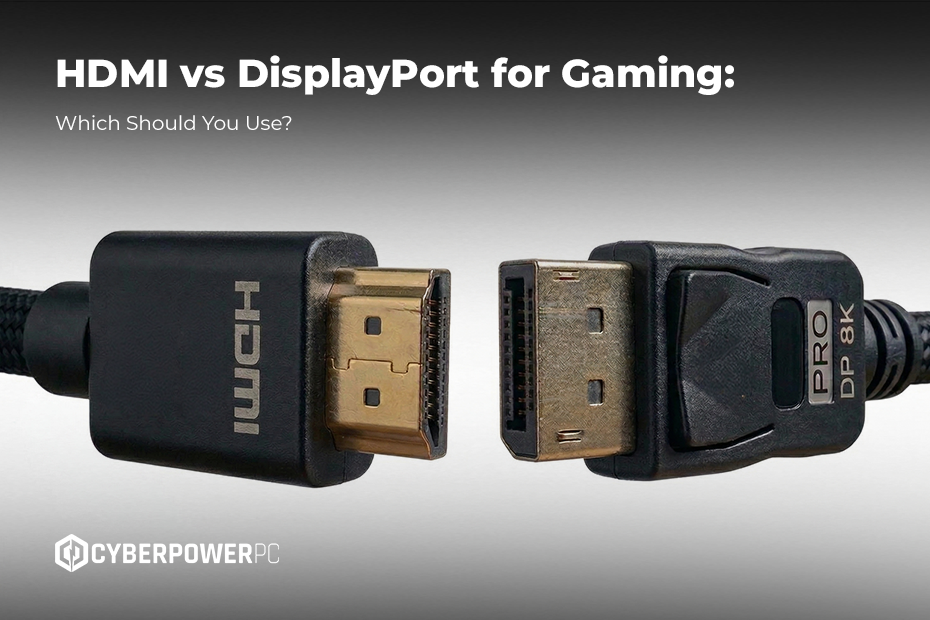
If you’re wondering what an HDMI cable looks like, it’s the slim, flat connector you’ve probably plugged into a TV or console dozens of times. A standard HDMI cable has a slightly trapezoid-shaped connector with 19 pins inside.
Are all HDMI cables the same?
HDMI cables are generally the same, but older varieties may not support high speeds. If you’re running 4K 120Hz, you need an Ultra High Speed HDMI cable. However, simply buying the most expensive one available will rarely improve picture quality beyond what the specification requires. A certified cable that meets the correct standard is what matters most.
Did you know that cable length affects signal integrity? HDMI cables tend to be quite long, so they can more easily connect TVs and devices, but a shorter lead is generally better for maintaining full bandwidth, especially at higher resolutions.
What Is HDMI 2.1?
If you’ve come across HDMI 2.1, you’re likely looking at modern consoles or 4K high-refresh displays. HDMI 2.1 is the latest major HDMI standard and significantly increases bandwidth over earlier versions. It supports:
- 4K at 120Hz
- 8K at lower refresh rates
- Variable Refresh Rate (VRR)
- Enhanced Audio Return Channel (eARC)
For PlayStation 5 and Xbox Series X players, HDMI 2.1 is essential for unlocking 4K 120Hz gaming on compatible TVs. Sony includes an Ultra High Speed HDMI cable designed for HDMI 2.1 performance with every PS5, but you can buy them separately if you need more than one.
For PC gamers, HDMI 2.1 narrows the gap with DisplayPort. However, DisplayPort 1.4 and 2.1 still tend to offer more flexibility for ultra-high refresh monitors.
What is DisplayPort?
DisplayPort is a digital display interface primarily designed for computers. It was introduced a few years after HDMI and quickly became popular in the PC space. It’s commonly found on gaming graphics cards and high-refresh-rate monitors.
Like HDMI, DisplayPort carries both video and audio. Where DisplayPort really shines is in high refresh rates, multi-monitor setups, and cutting-edge PC gaming performance.
Is DisplayPort better than HDMI for gaming?
For PC gaming, DisplayPort is generally better than HDMI. It typically offers:
- Higher refresh rate support at 1440p and 4K
- Easier multi-monitor daisy chaining (on supported monitors)
- Strong compatibility with adaptive sync technologies
If you’re gaming at 144Hz, 165Hz, 240Hz or beyond, DisplayPort is often the preferred option. However, HDMI isn’t bad for gaming and with HDMI 2.1, you can absolutely game at 4K 120Hz. In fact, for console players especially, HDMI is the standard and works brilliantly.
HDMI vs DisplayPort: The core differences
For everyday use, both HDMI and DisplayPort can deliver excellent image quality. Both support audio and 4K. The real decision comes down to:
- Your display type (monitor vs TV)
- Your refresh rate goals (120Hz, 144Hz, 240Hz+)
- Whether you’re gaming on PC or console
In general, HDMI dominates in TVs and consoles, while DisplayPort dominates in gaming PCs and monitors. If you’re connecting your PC to a TV for 4K couch gaming, use HDMI 2.1. If you’re using a gaming monitor with high refresh rates, use DisplayPort.
Can’t decide? Most modern graphics cards include both, so you’re not forced into choosing one. Both standards are active, too- HDMI 2.1 significantly improved the HDMI ecosystem, and newer DisplayPort standards push bandwidth even further.
Multi-monitor gaming
If you’re a PC user setting up dual monitors with HDMI, it can work- but DisplayPort is often easier and more flexible. Many GPUs include multiple DisplayPort outputs specifically for this reason. DisplayPorts also support daisy-chaining to compatible monitors, reducing cable clutter. For competitive gamers running dual 144Hz or 240Hz displays, DisplayPort is typically the smoother solution.
TVs, consoles, and media devices
While DisplayPort dominates the PC gaming space, HDMI rules the living room. This is because HDMI is universal across:
- Televisions
- Consoles
- Streaming sticks
- DVD and Blu-ray players
- Soundbars
- Home theatre systems
So if your gaming setup centres around a TV rather than a monitor, HDMI is non-negotiable.
Do HDMI and DisplayPort carry audio?
There’s a common misconception that HDMI is required for sound. In reality, both HDMI and DisplayPort transmit digital audio signals alongside video. If you’re using built-in monitor speakers, a headset connected to your PC, or routing audio through your GPU, either option can handle this without any additional audio cables.
Built-in monitor speakers rarely produce high-quality sound, so if you want to maximise your audio performance, it’s recommended that you use speakers or headphones.
What are HDMI ARC and eARC?
ARC stands for Audio Return Channel. It allows audio to travel both ways along an HDMI cable between your TV and a soundbar or AV receiver. For example, if you want to connect a soundbar to a TV with HDMI, ARC allows the TV to send audio back down the same cable, eliminating the need for a separate optical lead.
eARC (Enhanced Audio Return Channel) is an upgraded version that supports higher-quality audio formats. If you’re comparing optical vs HDMI ARC for soundbars, HDMI ARC (or ideally eARC) is generally the better option due to higher bandwidth and better audio format support.
For PC gamers using monitors rather than TVs, ARC isn’t too important, as it’s primarily a home-theatre feature. But if you’re a console gamer, it can take your set-up to the next level.
So, is DisplayPort better than HDMI? For PC gaming at high refresh rates – yes, in most cases. But is HDMI any good for gaming? Absolutely, especially with HDMI 2.1. Both cables carry audio. Both support 4K. Both deliver smooth, tear-free gameplay when paired with the right hardware. The key is choosing the right connection for your setup – console or PC.