

Featured Gaming PC Desktops

VIVID Infinity Gaming PC
Windows 11 Home (64-bit Edition) Intel® Core™ Ultra 7 270K PLUS NVIDIA® GeForce RTX™ 5070 Ti 16GB 32GB DDR5 5600MT/s ADATA XPG ARMAX RGB MSI MAG Z890 TOMAHAWK WIFI 1TB Kingston NV3 M.2 NVMe PCIe SSD
0 Review
Estimated dispatch date: Friday, 19/6/2026

AMD 9000-Series Ryzen Custom PC Builder
Windows 11 Home (64-bit Edition) AMD Ryzen™ 7 9850X3D NVIDIA® GeForce RTX™ 5060 Ti 16GB 32GB DDR5 APACER NOX ASROCK B650M-CX R2.0 m-ATX Motherboard 1TB Kingston NV3 M.2 NVMe PCIe SSD
Estimated dispatch date: Friday, 19/6/2026
Intel 14th Gen PC Builder
Windows 11 Home (64-bit Edition) Intel® Core™ i9-14900KF NVIDIA® GeForce RTX™ 5090 32GB Founders Edition 32GB DDR5 APACER NOX MSI PRO Z790-P WIFI ATX Motherboard 1TB Kingston NV3 M.2 NVMe PCIe SSD
Estimated dispatch date: Friday, 19/6/2026

VIVID Ultra Gaming PC
Windows 11 Home (64-bit Edition) AMD Ryzen™ 7 9800X3D MSI NVIDIA® GeForce RTX™ 5070 12GB 32GB DDR5 5600MT/s ADATA XPG ARMAX RGB MSI MAG B850 Tomahawk Max WIFI ATX Motherboard 1TB Kingston NV3 M.2 NVMe PCIe SSD
0 Review
Estimated dispatch date: Friday, 19/6/2026
Gaming PCs
Game to Win with CyberPowerPC UK
Attention, all serious gamers! Are you determined to take your gaming to the next level? Look no further than our range of gaming PCs, designed and built to be powerhouses ready to take on any challenge - from flawlessly executing gameplay to seamlessly multitasking and communicating without interruptions. Systems specifically designed with top-quality components to elevate your gaming experience to new heights.
Whether you're looking for an affordable option from our budget collection, a PC tailored to your favourite games, or a completely customised build using our PC configurator, we have you covered. When finding the gaming PC of your dreams, trust the CyberPowerPC UK team to deliver unparalleled performance.
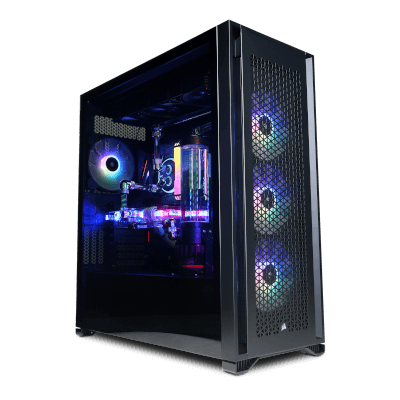

Hyper Liquid Ultra Dual
Windows 11 Home (64-bit Edition) AMD Ryzen™ 9 9950X3D MSI GeForce RTX™ 5090 32G VENTUS 3X - with Bitspower Nebula Classic VGA Block 64GB DDR5 Kingston Fury Renegade RGB MSI MPG X870E EDGE TI WIFI ATX Motherboard 2TB WD Black SN8100 NVMe
Hyper Liquid Ultra
Windows 11 Home (64-bit Edition) AMD Ryzen™ 9 9950X3D NVIDIA® GeForce RTX™ 5090 32GB Founders Edition 32GB DDR5 Kingston Fury Beast RGB MSI PRO X870E-P WIFI ATX Motherboard 2TB WD Black SN8100 NVMe
Estimated dispatch date: Tuesday, 23/6/2026
Hyper Liquid Infinity
Windows 11 Home (64-bit Edition) Intel® Core™ i7-14700KF NVIDIA® GeForce RTX™ 5090 32GB Founders Edition 32GB DDR5 Kingston Fury Beast RGB MSI MAG Z790 TOMAHAWK WIFI ATX Motherboard 2TB WD Black SN8100 NVMe
Estimated dispatch date: Tuesday, 23/6/2026
Ultra R9959 Gaming PC
Windows 11 Home (64-bit Edition) AMD Ryzen™ 7 9850X3D NVIDIA® GeForce RTX™ 5090 32GB Founders Edition 32GB DDR5 Corsair Vengeance RGB ASROCK B650M-CX R2.0 m-ATX Motherboard 2TB Kingston FURY Renegade NVMe PCIe SSD
0 Review
Estimated dispatch date: Friday, 19/6/2026


Ultra R9X Pro Gaming PC
Windows 11 Home (64-bit Edition) AMD Ryzen™ 9 9950X3D2 DUAL EDITION NVIDIA® GeForce RTX™ 5090 32GB Founders Edition 32GB DDR5 Corsair Vengeance RGB MSI Pro B850-S WIFI6E ATX Motherboard 2TB Crucial E100 M.2 PCIe 4.0 NVMe SSD
0 Review
Estimated dispatch date: Friday, 19/6/2026

Infinity X149 Gaming PC
Windows 11 Home (64-bit Edition) Intel® Core™ i9-14900KF NVIDIA® GeForce RTX™ 5090 32GB Founders Edition 32GB DDR5 APACER NOX MSI PRO Z790-P WIFI ATX Motherboard 2TB WD Black SN7100 M.2 NVMe PCIe SSD
Estimated dispatch date: Friday, 19/6/2026
Intel Ultra 9 Z890 PC Builder
Windows 11 Home (64-bit Edition) Intel® Core™ Ultra 9 285K NVIDIA® GeForce RTX™ 5090 32GB Founders Edition 32GB DDR5 APACER NOX MSI MAG Z890 TOMAHAWK WIFI 2TB Crucial E100 M.2 PCIe 4.0 NVMe SSD
Estimated dispatch date: Friday, 19/6/2026

Infinity U9 Gaming PC
Windows 11 Home (64-bit Edition) Intel® Core™ Ultra 9 285K NVIDIA® GeForce RTX™ 5090 32GB Founders Edition 32GB DDR5 APACER NOX MSI MAG Z890 TOMAHAWK WIFI 2TB Crucial E100 M.2 PCIe 4.0 NVMe SSD
Estimated dispatch date: Friday, 19/6/2026
AMD 7000-Series Ryzen 9 Custom PC Builder
Windows 11 Home (64-bit Edition) AMD Ryzen™ 9 7900X NVIDIA® GeForce RTX™ 5090 32GB Founders Edition 32GB DDR5 APACER NOX ASROCK B650M-CX R2.0 m-ATX Motherboard 1TB Kingston NV3 M.2 NVMe PCIe SSD
Estimated dispatch date: Friday, 19/6/2026

Ultra R97 Pro Gaming PC
Windows 11 Home (64-bit Edition) AMD Ryzen™ 9 9900X3D AMD Radeon™ RX 9070 XT 16GB 32GB DDR5 ADATA XPG Lancer Neon RGB MSI PRO X870E-P WIFI ATX Motherboard 2TB ADATA Mars 980 Blade M.2 PCIe 4.0 NVMe SSD

Infinity X147 Gaming PC
Windows 11 Home (64-bit Edition) Intel® Core™ i7-14700KF NVIDIA® GeForce RTX™ 5070 Ti 16GB 32GB DDR5 ADATA XPG Lancer Neon RGB MSI PRO Z790-P WIFI ATX Motherboard 2TB ADATA Mars 980 Blade M.2 PCIe 4.0 NVMe SSD
Estimated dispatch date: Friday, 19/6/2026
Ultra R77 Gaming PC
Windows 11 Home (64-bit Edition) AMD Ryzen™ 9 9950X3D2 DUAL EDITION AMD Radeon™ RX 9070 XT 16GB 32GB DDR5 APACER NOX ASROCK B650M-CX R2.0 m-ATX Motherboard 2TB Crucial E100 M.2 PCIe 4.0 NVMe SSD
Estimated dispatch date: Friday, 19/6/2026

Ultra R99 Elite Gaming PC
Windows 11 Home (64-bit Edition) AMD Ryzen™ 9 9950X3D2 DUAL EDITION AMD Radeon™ RX 9070 XT 16GB 32GB DDR5 APACER NOX ASROCK B650M-CX R2.0 m-ATX Motherboard 2TB Crucial E100 M.2 PCIe 4.0 NVMe SSD
Estimated dispatch date: Friday, 19/6/2026
Ultra R99 Gaming PC
Windows 11 Home (64-bit Edition) AMD Ryzen™ 7 9850X3D NVIDIA® GeForce RTX™ 5070 Ti 16GB 32GB DDR5 APACER NOX ASROCK B650M-CX R2.0 m-ATX Motherboard 2TB Crucial E100 M.2 PCIe 4.0 NVMe SSD
Estimated dispatch date: Friday, 19/6/2026

VIVID Elite Gaming PC
Windows 11 Home (64-bit Edition) AMD Ryzen™ 7 9850X3D AMD Radeon™ RX 9070 XT 16GB 32GB DDR5 5600MT/s ADATA XPG ARMAX RGB MSI MAG B850 Tomahawk Max WIFI ATX Motherboard 1TB Kingston NV3 M.2 NVMe PCIe SSD
0 Review
Estimated dispatch date: Friday, 19/6/2026
Infinity U9 Elite Gaming PC
Windows 11 Home (64-bit Edition) Intel® Core™ Ultra 9 285K MSI NVIDIA® GeForce RTX™ 5070 12GB 32GB DDR5 APACER NOX Gigabyte Z890 UD WIFI6E ATX Motherboard 2TB Crucial E100 M.2 PCIe 4.0 NVMe SSD
Estimated dispatch date: Friday, 19/6/2026
Ultra R77 Elite Gaming PC
Windows 11 Home (64-bit Edition) AMD Ryzen™ 7 9800X3D AMD Radeon™ RX 9070 GRE 12GB 32GB DDR5 APACER NOX ASROCK B650M-CX R2.0 m-ATX Motherboard 2TB Crucial E100 M.2 PCIe 4.0 NVMe SSD
Estimated dispatch date: Friday, 19/6/2026

Ultra R79 Gaming PC
Windows 11 Home (64-bit Edition) AMD Ryzen™ 9 7900X AMD Radeon™ RX 9070 GRE 12GB 32GB DDR5 APACER NOX ASROCK B650M-CX R2.0 m-ATX Motherboard 2TB Crucial E100 M.2 PCIe 4.0 NVMe SSD
Estimated dispatch date: Friday, 19/6/2026
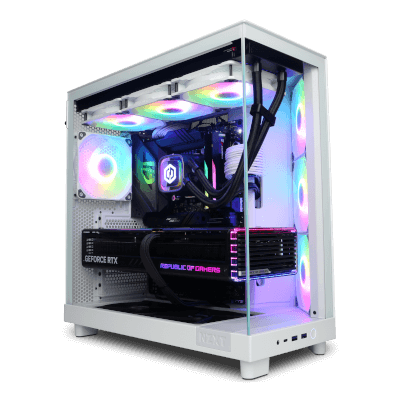
Ultra R79 Elite Gaming PC
Windows 11 Home (64-bit Edition) AMD Ryzen™ 9 7900X MSI NVIDIA® GeForce RTX™ 5070 12GB 32GB DDR5 APACER NOX ASROCK B650M-CX R2.0 m-ATX Motherboard 2TB Crucial E100 M.2 PCIe 4.0 NVMe SSD
Estimated dispatch date: Friday, 19/6/2026


Infinity Ultra 7 RTX Gaming PC
Windows 11 Home (64-bit Edition) Intel® Core™ Ultra 7 270K PLUS MSI NVIDIA® GeForce RTX™ 5070 12GB 32GB DDR5 APACER NOX Gigabyte Z890 UD WIFI6E ATX Motherboard 2TB Corsair MP700 Pro M.2 PCIe 5.0 NVMe SSD
0 Review
Estimated dispatch date: Friday, 19/6/2026
Infinity X129 Gaming PC
Windows 11 Home (64-bit Edition) Intel® Core™ i9-12900KF MSI NVIDIA® GeForce RTX™ 5070 12GB 32GB DDR5 APACER NOX MSI PRO Z790-P WIFI ATX Motherboard 2TB Crucial E100 M.2 PCIe 4.0 NVMe SSD
Estimated dispatch date: Friday, 19/6/2026
Intel 13th Gen PC Builder
Windows 11 Home (64-bit Edition) Intel® Core™ i7-14700KF MSI NVIDIA® GeForce RTX™ 5070 12GB 32GB DDR5 APACER NOX MSI PRO Z790-P WIFI ATX Motherboard 2TB Crucial E100 M.2 PCIe 4.0 NVMe SSD
Estimated dispatch date: Friday, 19/6/2026
Infinity U7 Gaming PC
Windows 11 Home (64-bit Edition) Intel® Core™ Ultra 7 265KF MSI NVIDIA® GeForce RTX™ 5070 12GB 32GB DDR5 APACER NOX Gigabyte Z890 UD WIFI6E ATX Motherboard 2TB Crucial E100 M.2 PCIe 4.0 NVMe SSD
Estimated dispatch date: Friday, 19/6/2026
Intel Ultra 7 Z890 PC Builder
Windows 11 Home (64-bit Edition) Intel® Core™ Ultra 7 265KF MSI NVIDIA® GeForce RTX™ 5070 12GB 32GB DDR5 APACER NOX GIGABYTE B860 DS3H WIFI6E ATX Motherboard 2TB Crucial E100 M.2 PCIe 4.0 NVMe SSD
Estimated dispatch date: Friday, 19/6/2026
Intel 12th Gen PC Builder
Windows 11 Home (64-bit Edition) Intel® Core™ i7-12700KF MSI NVIDIA® GeForce RTX™ 5070 12GB 32GB DDR5 APACER NOX MSI PRO Z790-P WIFI ATX Motherboard 2TB Crucial E100 M.2 PCIe 4.0 NVMe SSD
Estimated dispatch date: Friday, 19/6/2026

Sigil Pro SFF Mini Gaming PC
Windows 11 Home (64-bit Edition) Intel® Core™ i7-12700KF MSI NVIDIA® GeForce RTX™ 5060 Ti 8GB 32GB DDR5 APACER NOX MSI MPG B760i EDGE WIFI ITX Motherboard 2TB Crucial E100 M.2 PCIe 4.0 NVMe SSD

Sigil Elite SFF Mini Gaming PC
Windows 11 Home (64-bit Edition) AMD Ryzen™ 5 7500X3D AMD Radeon™ RX 9060 8GB 32GB DDR5 APACER NOX MSI MPG B850I EDGE TI WIFI ITX Motherboard 2TB Crucial E100 M.2 PCIe 4.0 NVMe SSD

Ion Elite SFF Mini Gaming PC
Windows 11 Home (64-bit Edition) AMD Ryzen™ 5 7500F MSI NVIDIA® GeForce RTX™ 5060 Ti 8GB 32GB DDR5 APACER NOX MSI MPG B850I EDGE TI WIFI ITX Motherboard 2TB Crucial E100 M.2 PCIe 4.0 NVMe SSD
0 Review
Estimated dispatch date: Friday, 19/6/2026
Infinity x127 Gaming PC
Windows 11 Home (64-bit Edition) Intel® Core™ i7-12700KF AMD Radeon™ RX 9060 XT 16GB 32GB DDR5 APACER NOX MSI PRO Z790-P WIFI ATX Motherboard 2TB Crucial E100 M.2 PCIe 4.0 NVMe SSD
Estimated dispatch date: Friday, 19/6/2026

AMD 7000-Series Ryzen 7 Custom PC Builder
Windows 11 Home (64-bit Edition) AMD Ryzen™ 7 7800X3D AMD Radeon™ RX 9060 8GB 32GB DDR5 APACER NOX ASROCK B650M-CX R2.0 m-ATX Motherboard 1TB Kingston NV3 M.2 NVMe PCIe SSD
Estimated dispatch date: Friday, 19/6/2026

Ion Pro SFF Mini Gaming PC
Windows 11 Home (64-bit Edition) Intel® Core™ i5-12400F MSI NVIDIA® GeForce RTX™ 5060 8GB 32GB DDR5 APACER NOX MSI MPG B760i EDGE WIFI ITX Motherboard 2TB Crucial E100 M.2 PCIe 4.0 NVMe SSD
Ultra R57 Gaming PC
Windows 11 Home (64-bit Edition) AMD Ryzen™ 7 5700X MSI NVIDIA® GeForce RTX™ 5070 12GB 16GB DDR4 3200mhz Memory ASUS B550M-K: M-ATX MB 1TB Kingston NV3 M.2 NVMe PCIe SSD
0 Review
Estimated dispatch date: Friday, 19/6/2026

Ultra R5RX Gaming PC
Windows 11 Home (64-bit Edition) AMD Ryzen™ 5 7500F AMD Radeon™ RX 9060 8GB 32GB DDR5 Corsair Vengeance RGB MSI B850 Gaming Plus WIFI6E ATX Motherboard 2TB Crucial E100 M.2 PCIe 4.0 NVMe SSD

Ultra R75 Custom Bundle Gaming PC
Windows 11 Home (64-bit Edition) AMD Ryzen™ 5 7500F MSI NVIDIA® GeForce RTX™ 5060 8GB 32GB DDR5 APACER NOX ASROCK B650M-CX R2.0 m-ATX Motherboard 1TB Kingston NV3 M.2 NVMe PCIe SSD
Infinity U7 Elite Gaming PC
Windows 11 Home (64-bit Edition) Intel® Core™ Ultra 7 265KF MSI NVIDIA® GeForce RTX™ 5060 8GB 32GB DDR5 APACER NOX GIGABYTE B860 DS3H WIFI6E ATX Motherboard 2TB Crucial E100 M.2 PCIe 4.0 NVMe SSD
Estimated dispatch date: Friday, 19/6/2026
Ultra R75 Gaming PC
Windows 11 Home (64-bit Edition) AMD Ryzen™ 5 7500X3D AMD Radeon™ RX 9060 8GB 32GB DDR5 APACER NOX ASROCK B650M-CX R2.0 m-ATX Motherboard 1TB Kingston NV3 M.2 NVMe PCIe SSD
Estimated dispatch date: Friday, 19/6/2026
Intel Ultra 5 Z890 PC Builder
Windows 11 Home (64-bit Edition) Intel® Core™ Ultra 5 225 AMD Radeon™ RX 9060 8GB 32GB DDR5 APACER NOX MSI H810M-B: m-ATX Motherboard 2TB Crucial E100 M.2 PCIe 4.0 NVMe SSD
AMD 7000-Series Ryzen 5 Custom PC Builder
Windows 11 Home (64-bit Edition) AMD Ryzen™ 5 7500X3D MSI NVIDIA® GeForce RTX™ 5060 8GB 32GB DDR5 APACER NOX ASROCK B650M-CX R2.0 m-ATX Motherboard 1TB Kingston NV3 M.2 NVMe PCIe SSD
Estimated dispatch date: Friday, 19/6/2026
AMD 5000-Series Ryzen 5 Custom PC Builder
Windows 11 Home (64-bit Edition) AMD Ryzen™ 5 7500F MSI NVIDIA® GeForce RTX™ 5060 8GB 32GB DDR5 APACER NOX ASROCK B650M-CX R2.0 m-ATX Motherboard 1TB Kingston NV3 M.2 NVMe PCIe SSD
Estimated dispatch date: Friday, 19/6/2026

Infinity X145 Custom Bundle Gaming PC
Windows 11 Home (64-bit Edition) Intel® Core™ i5-12400F NVIDIA® GeForce RTX™ 5050 8GB 32GB DDR5 APACER NOX MSI Pro H610M-E m-ATX Motherboard 1TB Kingston NV3 M.2 NVMe PCIe SSD
Ultra R57 Elite Gaming PC
Windows 11 Home (64-bit Edition) AMD Ryzen™ 7 5700X MSI NVIDIA® GeForce RTX™ 5060 8GB 16GB DDR4 3200mhz Memory ASUS B550M-K: M-ATX MB 1TB Kingston NV3 M.2 NVMe PCIe SSD
Infinity X135 Gaming PC
Windows 11 Home (64-bit Edition) Intel® Core™ i5-12400F AMD Radeon™ RX 9060 8GB 32GB DDR5 APACER NOX MSI Pro H610M-E m-ATX Motherboard 1TB Kingston NV3 M.2 NVMe PCIe SSD
Estimated dispatch date: Friday, 19/6/2026
Infinity X145 Elite Gaming PC
Windows 11 Home (64-bit Edition) Intel® Core™ i5-12400F MSI NVIDIA® GeForce RTX™ 5060 8GB 32GB DDR5 APACER NOX MSI Pro H610M-E m-ATX Motherboard 1TB Kingston NV3 M.2 NVMe PCIe SSD
Estimated dispatch date: Friday, 19/6/2026
Ultra R55 Elite Gaming PC
Windows 11 Home (64-bit Edition) AMD Ryzen™ 5 5500 NVIDIA® GeForce RTX™ 5050 8GB 16GB DDR4 3200mhz Memory Asrock A520M-HVS mATX Motherboard 1TB Kingston NV3 M.2 NVMe PCIe SSD
0 Review
Estimated dispatch date: Friday, 19/6/2026
Ultra R55 Gaming PC
Windows 11 Home (64-bit Edition) AMD Ryzen™ 5 5500 AMD Radeon™ RX 9060 8GB 16GB DDR4 3200mhz Memory Asrock A520M-HVS mATX Motherboard 1TB Kingston NV3 M.2 NVMe PCIe SSD
Estimated dispatch date: Friday, 19/6/2026
Nothing Found.
What is a Gaming PC?
A gaming PC is a specifically designed desktop computer to play video games. These computers typically have high-performance hardware components, such as powerful processors, high-end graphics cards, and fast memory, which allow them to run demanding games smoothly and at high resolutions. They often feature advanced cooling systems and other customisations to improve their performance and durability under heavy use. You can purchase a pre-built spec or customise one to suit your needs, budget and preferences as a gamer.
What makes a good Gaming PC?
A good gaming computer can handle modern AAA game demands without performance issues such as lagging or freezing. Several factors contribute to this matter.
Graphics Card (GPU)
A powerful graphics card is a crucial component of a good computer, enabling smooth gameplay and high-quality graphics. The graphics processing unit (GPU) performs fast calculations to render images and animations quickly, freeing up space on the system for other essential tasks. It is the most critical part of a system since it generates the images and scenes you see on screen, making gameplay happen.
NVIDIA GeForce RTX™ and AMD Radeon RX cards are graphics commonly used in gaming computers. Both types offer high-quality graphics and fast processing speeds but have different features and capabilities. The choice between the two largely depends on personal preference and budget.
NVIDIA GeForce RTX™ cards are recognised for their ray tracing technology, enabling more realistic lighting and shadow effects in games. They also provide advanced AI capabilities and DLSS technology to enhance performance. On the other hand, AMD Radeon RX cards offer similar cutting-edge features. Still, they are widely regarded as a better value-for-money option, making them a favoured choice for gamers and content creators.
We provide a vast range of graphics cards in our PC configurators, including the GeForce RTX™ 40 series, GeForce RTX™ 30 series, GeForce GTX™ 16 series, AMD Radeon RX 6000 Series, and the AMD Radeon RX 7000 Series. GeForce RTX™ 40 series, GeForce RTX™ 30 series, GeForce GTX™ 16 series, AMD Radeon RX 6000 Series, and the AMD Radeon RX 7000 Series.
Processor
For a seamless experience, a powerful and efficient processor, also known as a CPU, is crucial. It is responsible for processing data and instructions from the game and other applications. CPUs are specifically designed to process data at high speeds and thus require significant power to execute instructions and perform various tasks that enable gamers to play the most demanding games without disruptions.
The two best CPU brands are Intel and AMD. They both offer a wide range of processors with different specifications, such as clock speed, number of cores, and power consumption, to cater to different needs and budgets.
Intel CPUs are known for their high clock speeds and single-core performance, which can lead to better performance in certain situations. They are often considered the best choice at the very high end of the performance spectrum.
Alternatively, AMD Ryzen CPUs generally offer more cores and threads for multitasking and heavy workloads, which can result in better performance in tasks such as video editing, 3D rendering, and streaming. They are often seen as the best value-for-money option. They can offer comparable performance at a lower price than Intel CPUs.
Ultimately, the decision between Intel and AMD CPUs relies on personal requirements and tastes, including the budget, the games played, and other PC tasks. That's why we have a variety of PC configurations with different CPUs, such as the Intel Core 11th, 12th, and 13th generation and the AMD Ryzen 7000 and 5000 Series.
RAM
RAM, short for Random Access Memory, is a critical component in any PC as it allows quick data access—a higher amount of RAM results in better multitasking and faster loading times.
For gamers, 8GB of RAM is considered the baseline for AAA games. But for optimal performance, we recommend a capacity between 16-32GB.
Check out our DDR5 RAM range for the best memory available. DDR5 RAM is the newest generation of memory, offering faster speeds, increased bandwidth, and improved power efficiency than previous RAM generations. However, it may only be compatible with some systems or motherboards since it is still relatively new.
Before upgrading to DDR5 RAM, verifying your motherboard's compatibility is essential. Our PC configurator includes DDR5 RAM options from trusted brands like Corsair Vengeance and Kingston Fury. It will verify compatibility with your custom PC specifications.
Storage
Your computer's storage drive stores your games, files, and other data. You must have enough space to accommodate game data and other items, such as music and videos.
Although hard disk drives (HDDs) are popular among gamers because they offer more storage capacity for games, they lack start-up speed, especially when lengthy scenes take too long to load before gameplay.
SSDs are a type of storage device that use flash memory chips instead of spinning disks, which makes them faster and more power-efficient. NVMe SSDs are even faster and more efficient than traditional SSDs. They use a protocol called NVMe SSD (Non-Volatile Memory Express Solid State Drives) designed for solid-state storage. This results in quicker data access and transfer speeds, lower latency, and better energy efficiency than hard disk drives SATA-based SSDs.
Despite their advantages over HDDs, some gamers prefer to use an SSD and HDD combination to take full advantage of the fast speed of an SSD and the large capacity of an HDD.
Our PC configurator offers all these options from renowned brands such as Western Digital Black and Western Digital Blue, Kingston Fury, Solidigm, Seagate Firecuda, Seagate Barracuda, Seagate Ironwolf and Samsung to cater to all needs.
Cooling
Gaming computers generate heat, so good cooling is essential to prevent damage and maintain performance. There are several cooling solutions, including
Air cooling is the most common cooling for gaming PCs. It involves using fans and heat sinks to dissipate heat from the CPU and other components. Considered one of the older methods, Air cooling is inexpensive and easy to install, but you may need more for high-end rigs.
Liquid cooling uses a coolant to transfer heat away from components, making it more efficient than air cooling but also more expensive and complicated to set up. Consider our Hyper Liquid range for a high-end water-cooled PC built by our experts.
All-in-One (AIO) cooling combines air and liquid cooling elements. It typically involves using a fluid cooling system for the CPU and a few other components while using air cooling for the rest of the system.
Which cooling is best for a gaming PC depends on several factors, including the size of the case, the components, and the user's budget and preferences.
Aesthetics
Although not necessary for performance, many gamers prioritise the appearance of their computer, opting for a stylish design with unique case aesthetics and LED lighting. This has given rise to various computer cases designed explicitly for gaming, with features such as tempered glass panels, RGB lighting, and custom engraving designs.
Some gaming PCs even incorporate liquid cooling systems with radiant tubing and fluid, adding to the overall visual appeal of the system. Ultimately, the aesthetic design of a computer is a matter of personal preference and can range from minimalist to flashy, depending on the gamer's style.
Getting the Best Gaming PC is all about the Right Balance
Overall, a well-rounded gaming computer requires powerful hardware components capable of handling modern games, efficient cooling to prevent overheating, and sufficient storage space for games and other applications. Our team of experts and range of PC specs can assist you in achieving this balance.
CyberPowerPC UK's Approach
To reflect our commitment to delivering the best PC experience, we offer a diverse range of custom and prebuilt specifications that cater to the unique needs of every gamer.
Custom Built PCs
Our team of spec experts has curated a range of pre-configured PC specs with different performance levels, features, preferences, and budgets in mind. These preconfigured options provide a quick and easy starting point but can be fully customised to suit individual needs. Whether you buy or customise the pre-configured spec, our PC builders will construct each gaming system from scratch to ensure the best possible performance and quality
Our gaming PC range is categorised based on gaming needs, such as VR Ready, PC bundles, and gaming and streaming PCs. We also offer components like our Intel and AMD configurators, NVIDIA gaming PCs, Corsair iCUE and HydroX, or PCs powered by MSI. If you still need to decide which option to choose, check out our most award-winning gaming desktops or our current best sellers.
Prebuilt PCs
There is often confusion surrounding the term "Prebuilt PCs" within the gaming community; many will consider all prebuilt PCs made by a PC manufacturers, regardless of whether or not they are customisable. The alternative in the community is DIY PC builders who prefer to build their systems from scratch.
However, we use this term to differentiate our instant-ship range from our custom PCs built to order. Our Prebuilt PC range is still configured by our team of PC spec experts and utilises the same high-end components as our custom gaming range. The only difference is that they are already built and ready to ship to your door. These systems are also available for next working day delivery if ordered before 2 pm Monday-Friday.
Our Prebuilt Gaming PC range includes Next-day AMD, Intel or Nvidia PCs and our instant ship gaming laptops.
Built by Experts
Our team is highly experienced in building PCs for all types of gamers, regardless of skill level. Whether you are an entry-level PC gamer or a professional streamer, we are here to help you create your perfect setup by providing the tools and knowledge necessary to elevate your experience.
So, whether you're looking to showcase your skills on Twitch or dominate your opponents in online battle royales with high frame rates, our specialists are ready to assist you in building your dream PC.
We're Gamers, Too
At our core, we're gamers like you and understand the importance of a seamless gaming experience. Our passion drives us to share our knowledge and expertise with anyone who needs it. Whether you're a beginner looking to enter the world of PC gaming or a seasoned pro seeking the latest upgrades for your setup, we're here to help.
Share your needs with us; we'll go the extra mile to ensure you get the best gaming desktop possible.
Premium 5-Year Warranty
We stand behind the quality of our PCs and offer a comprehensive warranty to our customers. With every gaming system purchase, you will receive a two-year part and five-year labour warranty, ensuring peace of mind with your investment. Additionally, our lifetime technical support means that we are always available to help you with any issues you may encounter
Upgrade your warranty service through our system configurators for added protection.
Delivery
Custom Gaming PCs
Our team of experts will custom-build your PC to order and perform rigorous quality testing before dispatch. We aim to dispatch your PC within 7-14 working days from the time you place your order, accounting for order processing and building times.
Prebuilt Gaming PCs
Order any of our prebuilt gaming PCs by 2pm Monday-Friday for same-day shipment and next-day delivery. Please order by 2pm on Friday to guarantee Saturday and Sunday deliveries.
Important notice: Occasionally, a prebuilt system may be listed as pre-order due to stock shortages. If a system is listed as pre-order, it will be clearly highlighted in the system's description, and we will not be able to deliver it to you the following day. However, we'll place your order on a pre-order list, and as soon as we have it back in stock, we will deliver it to you the next working day.
Finance Options
We understand that some customers may need more immediate means to purchase their desired PC upfront. To make our systems more accessible, we offer a fantastic range of finance options with offers as low as 0% APR and finance options starting as low as £15.46 per month.
Upgrade Later
At CyberPowerPC UK, we understand that technology constantly evolves, and your needs may change. That's why we offer all our previous customers the flexibility to upgrade their Cyberpower system with a new, compatible component at any time. Whether you want to boost your system's performance with a more powerful graphics card or increase your storage capacity with a larger hard drive, we've got you covered.
Moreover, as a token of our appreciation to our loyal customers, we offer discounts for any upgrades you make to your CyberPowerPC UK system. Our team will guide you through the upgrade process and recommend the best components for your needs. If you want to take your gaming experience to the next level, don't hesitate to contact our team to discuss your upgrade options.
Upgrade Later
Our collection of gaming peripherals has everything you need to enhance your gaming experience, including premium gaming keyboards, monitors, headsets, and must-have streaming decks. You can easily add these peripherals to your order using our PC configurator or buy them separately on our website.
We take pride in working with only the best suppliers in the industry to provide our customers with top-quality components and peripherals from leading brands built to last. When you shop
Custom & Prebuilt Gaming PCs | CyberPowerPC UK FAQs
If you don't see your question below, contact us or visit our FAQ page for more information.
What is the difference between a Gaming PC and a regular PC?
A gaming PC is designed to provide optimal performance for video games. In contrast, a regular PC is intended for general computing tasks such as browsing the web, creating documents, and sending emails. Gaming PCs typically have higher-end components, such as a dedicated graphics card, a powerful processor, and a large amount of memory (RAM), to handle the demands of modern video games.
They also often have specialised cooling systems and higher-quality audio and visual components to provide a more immersive experience. On the other hand, regular PCs are typically designed for primary everyday use. They may not have the same performance or components as a gaming PC.
How much does a Gaming PC cost?
The cost of a Gaming PC can vary widely depending on your chosen components and specifications. You can find Gaming PCs on the lower end of the price spectrum for around £500-£800, while high-end Gaming PCs with top-of-the-line components can cost upwards of £2,000 or more. Ultimately, the cost will totally depend on your personal preferences, needs, and budget.
What is better Gaming PC or Console?
Conversely, consoles are generally more affordable and user-friendly, with more straightforward setup and maintenance. They often have popular exclusive titles and are optimised for gaming on television, making them a popular choice for those who prefer a more casual gaming experience.
Overall, it depends on your individual needs and preferences. A gaming PC may be better if you want the best graphics, customizability, and a wider selection of games.
Is it cheaper to build or buy a Gaming PC?
While building your PC can sometimes save you money if the market is favourable for component prices, there are several benefits to purchasing a prebuilt system. If you lack experience in building computers, there is a risk of making costly mistakes. Identifying the source of errors can be challenging, leading to wasted time and money. This issue is especially prevalent for those who are new to the process.
On the other hand, purchasing a prebuilt system eliminates these risks, as our specialists take care of that for you. You can avoid the hassle of troubleshooting and deal with multiple warranties from various manufacturers. If something goes wrong, our team will handle the issue for you, providing peace of mind and saving you time and money in the long run. Overall, while building your PC may seem cheaper initially, the benefits of a prebuilt system often outweigh the costs.
Is 4K good for gaming?
When it comes to gaming at 4K resolution, it requires significantly more processing power than just watching movies or browsing the web. 4K resolution means four times as many pixels on the screen than a standard 1080p display, which translates into a greater demand on the graphics card and processor.
To play games at 4K resolution, you need a powerful graphics card that can handle the increased workload. Even with mid-tier graphics cards, you can achieve reasonable frame rates in some older AAA games. Still, for the best experience, the most powerful graphics cards are required. High-end GPUs, such as the NVIDIA GeForce RTX 3090 or the AMD Radeon RX 6900 XT, are designed specifically for 4K gaming and can deliver smooth frame rates even on the most demanding games.
However, it's about more than just having a powerful graphics card. It would be best to have a high-end CPU, plenty of RAM, and a fast storage drive to ensure the system can handle the increased workload of 4K gaming. A high-end monitor that can display 4K resolution and supports a high refresh rate is also recommended to fully experience the increased detail and smoothness of 4K gaming.
Overall, gaming at 4K resolution is a demanding task that requires a high-end PC with powerful components. If you're serious about 4K, investing in the best hardware available is important to get the best possible experience.